Your freelance life,
now on the web
FreeEquipe is in the browser too. Accept shifts, build your schedule, track your wallet with withdrawals and advances, chat with the company, and manage your profile, all in sync with the app, on the big screen and with nothing to install.
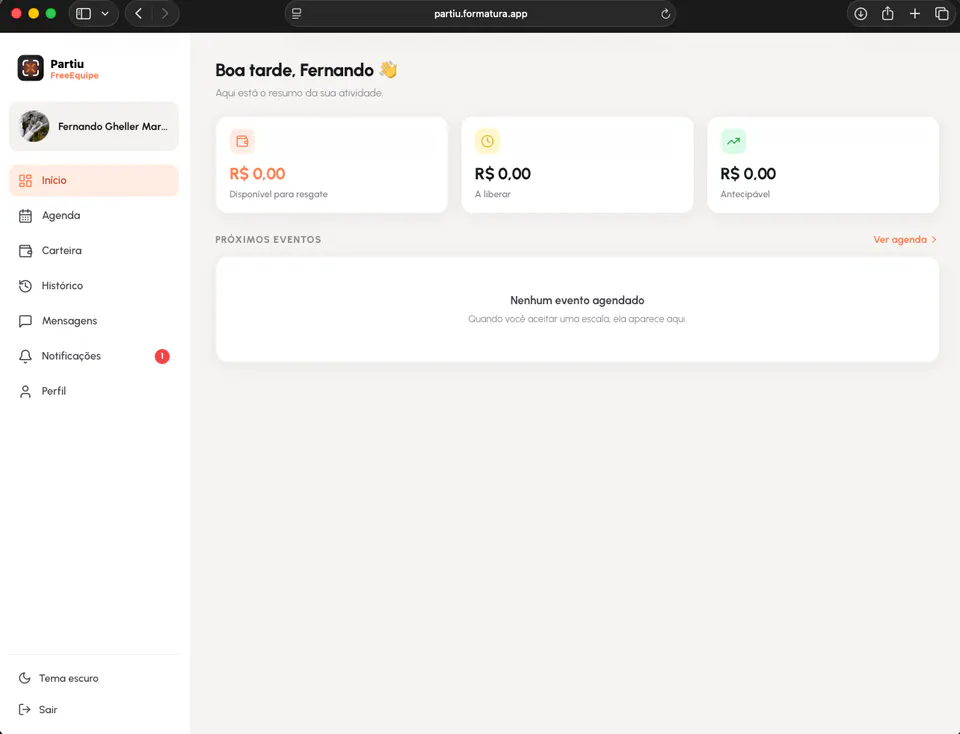
From invitation to payment, in one place
The same features as the app, now with the comfort of your computer. Everything in sync, wherever you are.
Home & summary
A dashboard with your activity summary and wallet amounts always in view.
Job invitations
Receive invitations for openings by role and accept the ones that suit you.
Schedule & shifts
Build your schedule with accepted shifts and see upcoming events.
Wallet
Track your earnings, with amounts available to withdraw, pending release, and eligible for advance.
Withdrawals & advances
Withdraw via Pix and get eligible amounts in advance when you need them.
History
See your event and payment history, fully recorded and transparent.
Messages
Chat in real time with the company that hires you, right in the portal.
Notifications
Stay on top of new invitations, shifts, and payments as they happen.
Profile & reputation
Keep your profile up to date and follow your reputation after each event.
Your money under control
See in a clear summary what is available to withdraw, what will be released later, and what you can get in advance. Withdraw via Pix, view the history of each event, and get paid with the transparency of a wallet built for graduation freelancers.
- See what is available to withdraw
- Track what will be released later
- Get eligible amounts in advance
- Everything in sync with the app
From invitation to withdrawal in three steps
Sign in to the portal
Access your account in any browser, on your computer or phone.
Accept shifts
Receive job invitations, accept shifts, and build your schedule.
Get paid and withdraw
Work the events and track your wallet, with Pix withdrawals and advances.
Open FreeEquipe on the web
Freelancer schedule, shifts, and wallet in the browser. Sign in with your account, nothing to install.
Prefer your phone? Meet the FreeEquipe app.
Manage your field team.
FreeEquipe comes from the same platform that powers the app and portals. Subscribe and build your freelancer team with openings by role, shifts with automatic invitations, a wallet and payouts posted to Accounts Payable, chat, and ratings, all in the app and on the web portal.
- Freelancer team by role
- Shifts with automatic invitations
- Wallet and freelancer payouts
- Payouts posted to Accounts Payable
- Chat and reputation ratings
- Available in the app and on the web portal