Saw something wrong?
Tell someone who can look into it
Your graduation company's ethics hotline, open on the web, to report harassment, fraud, discrimination or any conduct that goes against the law and the code of conduct. The report can be anonymous, you get a case number right away and you follow the investigation through to its conclusion without ever identifying yourself.
No sign-up, nothing to install. Every company gets its own address: company.formatura.app/etica
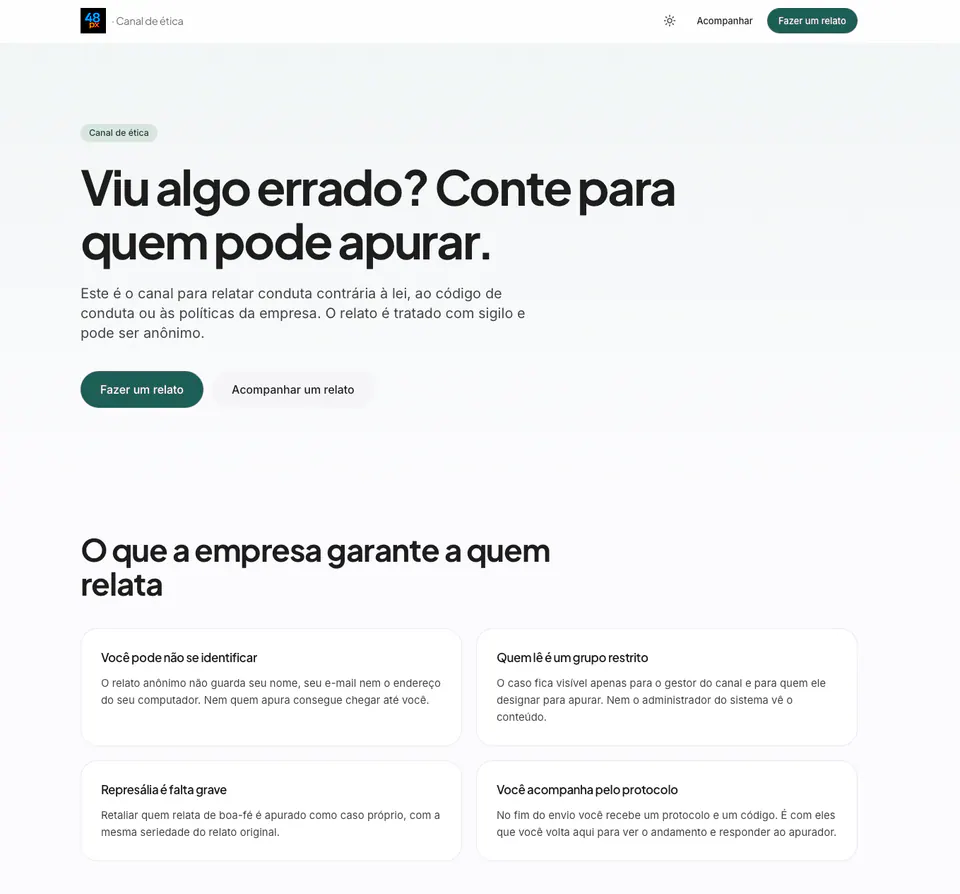
Speak up without fear
An ethics hotline only works if the person reporting trusts it. These guarantees are not a promise on a screen: they are built into how the portal works.
You may stay anonymous
An anonymous report keeps no name, no email and no address of the computer you used.
Only a small group reads it
The case is visible to the hotline manager and to whoever they assign. Not even the system administrator sees the content.
Retaliation is serious misconduct
Retaliating against someone who reports in good faith is investigated as a case of its own, just as seriously as the original report.
Case number right away
At the end of the submission you get a case number and a code to come back and follow the investigation.
Agreed deadlines
The hotline states the investigation and response deadlines the company committed to, before you report.
Attachments are optional
If you have a document, a photo or a screenshot, add it. If you do not, report anyway.
A conversation with the investigator
A request for more information and your answer happen inside the case number, with no email involved.
A recorded conclusion
The outcome of the investigation becomes visible to you in the follow-up, through the case number.
The hotline is your company's
Name, logo, categories and deadlines are the ones your graduation company configured.
An anonymous report keeps nothing about you
When you choose not to identify yourself, the case is filed with no name, no email and no computer address. Not even the investigator can trace it back to you. The portal also stores nothing in the browser: case number and code never go to localStorage or to a cookie, because a shared computer is the normal situation for someone using an ethics hotline.
- No personal data is required to report
- Nothing is stored in the computer's browser
- The hotline stays out of search (noindex, no-referrer)
- No listing, no counter, no public dashboard
Eleven subjects, a single path
The company chooses which categories the hotline accepts. Each one comes with a plain explanation of what belongs there, so you are not left guessing before you write.
Workplace harassment
Humiliation, isolation, abusive pressure or threats at work.
Sexual harassment
Unwanted advances, comments or contact of a sexual nature.
Corruption or bribery
An undue advantage requested, offered or accepted, inside or outside the company.
Fraud
Altered documents, fake invoices, diverted goods or money.
Conflict of interest
A personal interest influencing a decision, a hire or a purchase.
Discrimination
Unequal treatment by race, gender, orientation, religion, age or disability.
Workplace safety
Risk to physical safety, unfit equipment, a dangerous order.
Misuse of personal data
Improper access to, use of, or leak of personal data.
Environmental issue
Irregular disposal, environmental damage, breach of a permit.
Financial irregularity
Irregular entries, unbacked payments, manipulated results.
Something else
It does not fit the options above and still needs to be investigated.
What does not belong here
A question about payroll, benefits, vacation, an invoice or a delivery date is ordinary support, and the usual channel solves it faster. A life-threatening emergency is always a call to the local emergency number.
You do not need proof
Just tell in good faith what you saw, when it happened and who was involved. Attaching a file is optional. A report made in bad faith, knowing the fact is false, is investigated too.
From report to conclusion in four steps
You report
You tell what happened, when it was and who was involved. You choose to stay anonymous or to identify yourself. Attaching a file is optional.
The case is filed
The case number and the follow-up code appear right away, within the investigation deadline the company committed to.
The company investigates
The hotline manager assigns an investigator. If information is missing, the request reaches your case number within the response deadline.
You receive the conclusion
The outcome becomes visible in the follow-up, through the case number, without you having to identify yourself at any point.
The follow-up is yours, not the company's
At the end of the submission the screen shows a case number and a follow-up code, with a button to copy and another to download them as a file. That is your pair of keys: with it you come back to the hotline, see where the investigation stands, read what the investigator made visible, answer a request for information and receive the conclusion. No login, no email, no name.
- Investigation progress by case number
- Messages from the investigator and your reply
- A new attachment at any time
- The conclusion once the investigation closes
The code is shown only once. The server keeps nothing but its hash. There is no "I forgot my code": recovering it by email would tie the case to an address, and that would be the end of anonymity.
- Received
- Under investigation
- Awaiting information
- Concluded
What the hotline does not do, on purpose
In an ethics hotline, every feature left out is one more protection for whoever reports.
Stores nothing in the browser
Case number and code never go to localStorage, sessionStorage or a cookie. A shared computer is the rule, not the exception.
Does not recover codes
The server keeps only the hash of the code. An "I forgot my code" flow by email would tie the case to an address and end anonymity.
Stays out of search
The hotline answers with noindex, nofollow and no-referrer. Whoever needs it arrives through the link the company publishes.
Lists nothing, counts nothing
The public side exposes no listing, no metric and no case count. It files a report and shows only what the investigator released.
Your report starts a real investigation
It takes a few minutes and you choose whether to identify yourself. Your company's hotline lives at the address it publishes, always on its own subdomain.
Do not know your company's hotline address? Talk to us.
A whistleblowing channel ready for the law.
The public hotline is the front door of the Compliance Control module, inside the platform itself. You set the hotline manager, the accepted categories, the investigation and response deadlines, and open the channel with one click. Each report lands in the panel with a case number, an investigation trail, messages to the whistleblower, attachments and a recorded conclusion, meeting the whistleblowing-channel requirement of Brazilian Law 14.457/2022 and the data handling rules of the LGPD.
- Public hotline with your company name and logo
- Hotline manager and investigators assigned per case
- Configurable categories, deadlines and texts
- Ready-made address, QR code and publication text
- Investigation trail, messages and attachments in the panel
- Aligned with Law 14.457/2022 and the LGPD
The panel shows the ready-made hotline address, with a copy button, a PNG QR code and a publication text for a poster or an internal announcement.