Design and order
your album
Create your graduation album in a simple step-by-step flow: choose a template, select the photos (including with facial recognition), customize, preview, and place your order with home delivery. Start on your phone and continue on your computer whenever you like.
From template to your door, hassle-free
A guided wizard takes you from choosing photos to ordering the printed album, on your computer or phone.
Choose a template
Start from a ready-made template and give your album the look of your graduation.
Select your photos
Pick your favorite photos, including with gallery facial recognition.
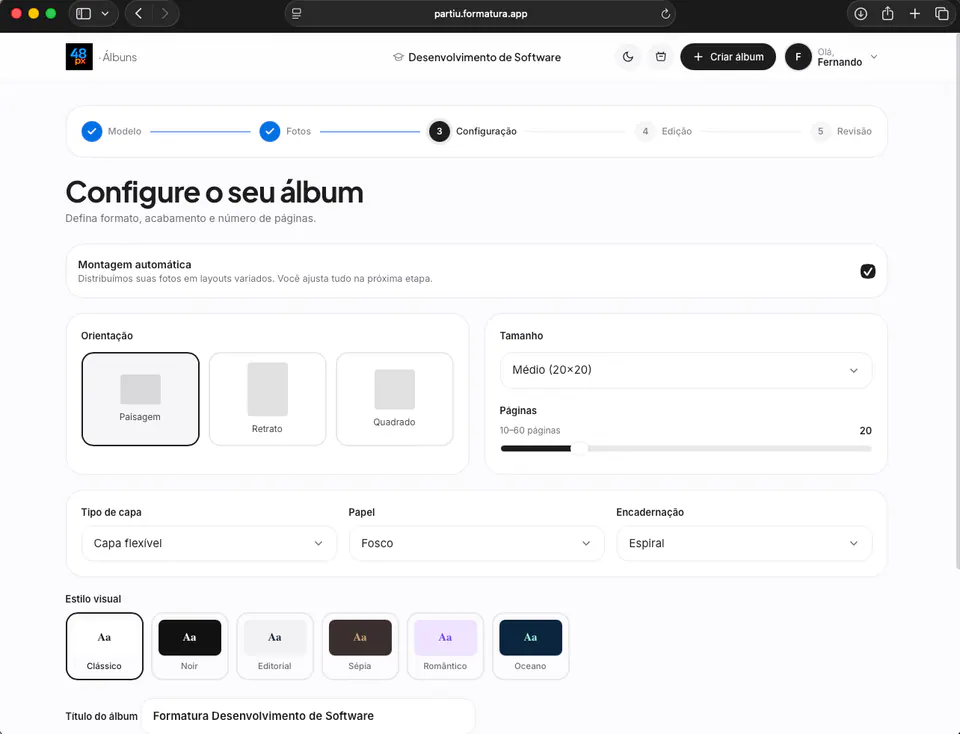
Format & finish
Set orientation, size, page count, cover, paper, and binding.
Automatic layout
We arrange your photos in varied layouts, and you fine-tune everything in the next step.
Visual styles
Classic, Noir, Editorial, Sepia, Romantic, or Ocean: choose the mood of your album.
Free editing
Reorder pages, swap photos, and adjust layouts your way before finishing.
Preview & review
See the complete album preview and review every page before placing your order.
Delivered to your home
Shipping calculated by region and the printed album delivered to your address.
Pay your way
The company’s payment methods and installments, added to your graduation payment plan.
Start on your phone, finish on your computer
Select photos in the app during the week and finish the layout calmly on your computer, on the big screen. Everything stays in sync. And facial recognition automatically finds the photos you appear in, so your album is ready sooner.
- Start on your phone, continue on your computer
- Photos found with facial recognition
- Preview before placing your order
- Printed album delivered to your home
From template to order in three steps
Template and photos
Choose a template and select your photos, with help from facial recognition.
Set up and edit
Set the format, cover, and style, use the automatic layout, and adjust the pages.
Review and order
See the preview, check shipping, and place your order with home delivery.
Design your album
Choose your photos, customize, and get your printed album delivered home. Start now, with nothing to install.
Run a graduation company? Talk to us.
The album is one more automatic sale.
The Album portal comes from the same platform that powers the app and portals. Subscribe and offer graduates guided album design, with templates in your brand, facial recognition, regional shipping, payment methods, and installments added straight to the graduation payment plan.
- Album templates with your brand
- Guided step-by-step design
- Facial recognition in galleries
- Regional shipping (state + ZIP code)
- Your company payment methods
- Installments added to the graduation payment plan